Computational Thinking (CT) has been recently regarded as a critical skill in modern education, as a means of adapting to the future (Hsu, Chang, Hung, 2018). As defined by New South Wales Education Standards (2017), CT is the thought processes used when formulating a problem and finding its solutions. Not only does CT regard the ability to solve the problem, but also, the ability to find and formulate the problem so that a computer, being human or machine, can effectively implement the solutions (Wing, 2006). CT further elevates creative and critical thinking skills by drawing on the concepts fundamental to computer science (Wing, 2006). In addition, students use a wide range of cognitive aptitudes to analyse problems by using strategies to logically organise data, break down problems into parts, interpret patterns and design and implement algorithms to solve problems (Berry, 2013).
Micro:bit, is a pocket-sized programming technology allowing students to deeply engage in CT, providing them with the opportunity to learn and refine a range of coding, programming and algorithm skills. Micro:bit is easily accessible, with an array of creative outputs allowing for numerous ideas to be developed.
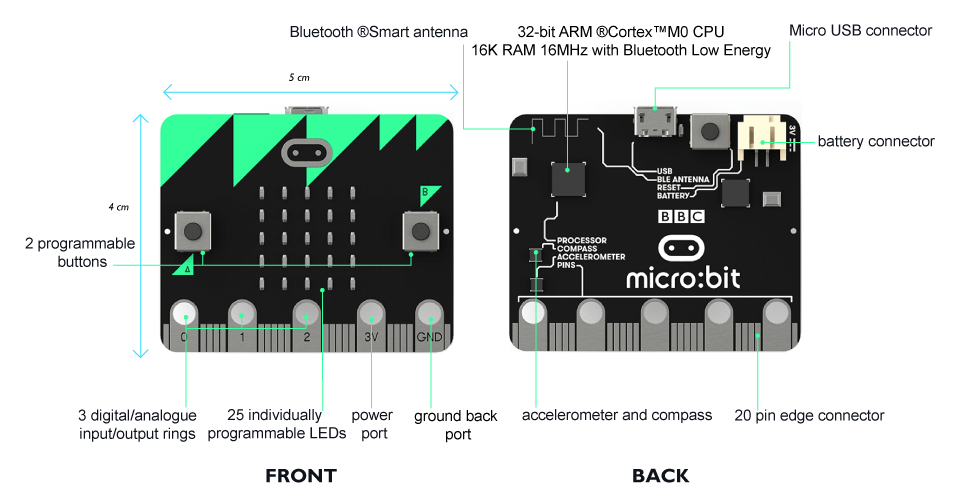
Using the built-in features like the buttons, LED display – which can work as light, movement and/or temperature sensors, and compass and radio communication between micro:bits, you can create animations, night-lights, fitness trackers, simple games, and more. This is the same as the Go-go board, in which students create similar projects through a more complex system. With the addition of a few inexpensive accessories like crocodile clip leads, aluminum foil, cardboard and headphones, students will have the potential to do even more, as seen here:
Both Micro:bit and the Go-go board can be used in all subject areas including, but not limited to; visual arts, music, geography, and PDHPE. Furthermore, there are numerous evident pedagogical strategies which can be implemented when integrating both micro:bit and go-go board in the classroom to further foster creativity. The negatives I discovered are in relation to the setting-up phase. It can be quite tedious and time consuming when connecting Bluetooth and making sure the correct software, technology, and internet has been downloaded and is working correctly.
In saying this, the positives greatly outweigh the negatives and micro:bit is an excellent software to foster creativity and engage students in CT throughout many facets of education.
Berry, M. (2013). Computing in the national curriculum – A guide for primary teachers [Ebook]. Computing at School. Retrieved 2 April 2020, from https://community.computingatschool.org.uk/resources/2618/single#.
Digital Technologies. Australiancurriculum.edu.au. (n.d.). Retrieved from: https://www.australiancurriculum.edu.au/f-10-curriculum/technologies/digital-technologies/.
Hsu, T., Chang, S., & Hung, Y. (2018). How to learn and how to teach computational thinking: Suggestions based on a review of the literature. Computers & Education, 126, 296-310. https://doi.org/10.1016/j.compedu.2018.07.004
NESA. (2017). K-6 Science and technology syllabus.
Wing, J. (2006). Computational thinking. Communications Of The ACM, 49(3), 33. https://doi.org/10.1145/1118178.1118215
 Elise's Blog